Your profile, ready to check
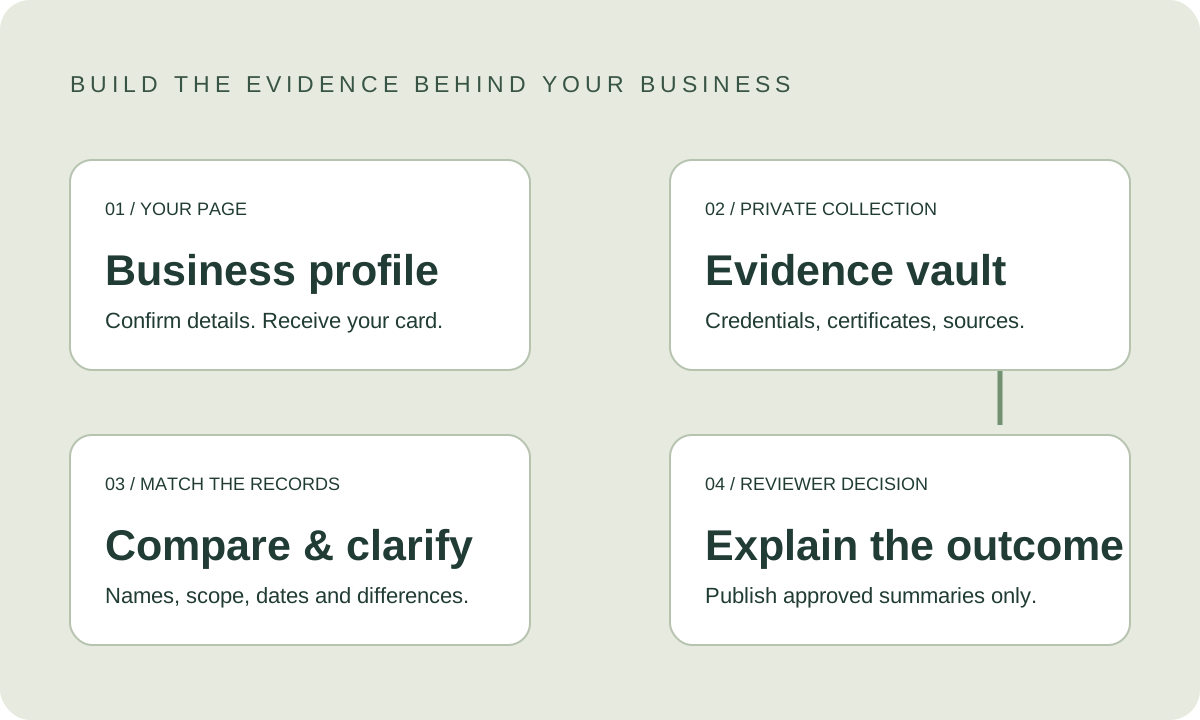
Receive your own page card and confirm the business name, real operating address, service areas and contact person.
Your Five Eyes review
You’re a few steps from your Five Eyes review. Confirm your page, gather the right evidence and let the review explain what it supports.
Receive your own page card and confirm the business name, real operating address, service areas and contact person.
Open a private, expiring invitation. Confirm you represent the business before accessing its evidence request.
Provide the registration, insurance, relevant certificates and proof of work requested for your trade. Each item has its own issuer, scope and dates.
Documents belong to the business record. The business and authorised EyeSpyR reviewers can access them; public profiles show only approved summaries.
Review names, registration or certificate references, dates, service scope and issuing organisations. Differences become questions for review, not automatic accusations.
A reviewer checks the evidence and any responses, records the outcome and its date, and publishes only the facts approved for the public profile. Five Eyes is not guaranteed by uploading.
Collect the right records
Keep the original file with its source, scope, issue and expiry dates. If an item does not apply, explain why instead of supplying unrelated paperwork.
Legal and trading names, business registration and public registry reference.
Certificate, named insured, issuer, covered work, effective period and expiry.
Relevant trade licences, professional credentials and issuing-body references.
Workers’ compensation or relevant safety-board record where applicable.
Permission-cleared project examples, scope and completion records.
Compare, then review
Assisted comparisons help organise a reviewer’s work. They do not decide the rating, certify authenticity or turn a discrepancy into a public allegation.
Compare legal entity, trading name and named insured. Record an explained trading-name difference rather than treating it as a failed match.
Compare credential identifiers, issuer, issue date, effective dates and expiry. A newly uploaded file does not renew an expired credential.
Check the work and jurisdiction covered. A service area does not become a registered office or shop address.
Shared issuer layouts and templates can be normal. Similarity, formatting changes or OCR uncertainty trigger a reviewer’s question; they do not establish authenticity or wrongdoing.
Keep both versions, the source and the business response. Verify material discrepancies with the issuer where appropriate and authorised.
Example invitation · not sent
 Full Flow Hydraulics · View the profile ↗
Hi, Your Full Flow Hydraulics profile is ready to look over: https://www.eyespyr.com/businesses/full-flow-hydraulics/ You’re a few steps from your Five Eyes review. First, check the business details, then provide the credentials and certificates relevant to your work through your private evidence invitation. We’ll send your private evidence invitation when the vault is ready. Please don’t reply with private documents yet. We’ll compare the names, issuing organisations, scope and dates, and ask you to clarify anything that differs. Uploading starts the review; a Five Eyes outcome depends on the evidence and reviewer decision. Your original documents stay private. Only approved verification summaries belong on your public profile. EyeSpyR